
 GROWTH GUIDE
Can You Remove Fake Google Reviews? Here's What Works
Google removes reviews only when they violate specific policies, not simply because they are unfair or unfavorable. That means you can’t unilaterally delete a review, but you can absolutely get it taken down if you build the right case. Your first move: flag the review in Google Maps or your Business Profile under the exact policy category it breaks.
While you’re there, do three things at once. Capture screenshots of the review and the reviewer’s profile early to preserve evidence. Post a short, calm public reply so anyone reading it sees your side while the report processes. Choose the closest policy reason instead of a generic “inappropriate” tag, since that routes your case faster.
Set your expectations now: Google’s automated checks typically take some days to process your report.(https://blog.google/products/maps/how-google-maps-reviews-work/), and if the flag gets rejected, you generally get one appeal. Treat that appeal like your one real shot, because it is.
Key Takeaways
Removing a fake Google review depends on matching it to a specific policy violation, documenting your evidence with the four-flag test, and using your one appeal wisely.
| Point | Details |
|---|---|
| Verdict first | Google removes only reviews violating its content policies, never simply negative ones. |
| Flag with precision | Choose the exact policy category in the report dropdown to avoid an automated rejection. |
| Use the four-flag test | Check identity, motive, content, and relevance before deciding whether to escalate. |
| One appeal counts most | Treat your single appeal as your best shot; back it with organized, timestamped evidence. |
| Consider managed support | Service Grower monitors reviews, archives evidence, and helps manage escalation for owners short on time. |
This article is general information, not a substitute for advice from a qualified lawyer. Consult a qualified legal professional about your own circumstances before acting on anything here.
Table of Contents
- How to Remove Fake Google Reviews: The One-Minute Triage
- Flagging a Fake Review Through Google’s Official Tools
- What Google Actually Removes From Business Profiles
- Building Your Case: The Four-Flag Evidence Test
- When to Escalate a Rejected Google Review Report
- Responding to Reviews and Preventing the Next Fake One
- How Long Does It Take to Remove a Fake Review?
- What Not to Do When Fighting a Fake Review
- How Service Grower Handles Fake Review Monitoring
- If You Want Help: What Service Grower Does Next
- Sources
How to Remove Fake Google Reviews: The One-Minute Triage
Before you write a single word of a report, do this in order:
- Find the review on your Business Profile or in Google Maps and open it.
- Click the three dots in the top corner of the review.
- Select “Flag as inappropriate” or “Report review,” depending on the interface.
- Pick the policy reason that most closely matches the violation (spam, off-topic, hate speech, and so on).
- Capture three screenshots: the review itself, the reviewer’s public profile, and any other reviews from that same account that look suspicious.
Label your screenshots by date and business name as you go. A folder named “Smith HVAC review dispute, March 2026” beats a phone camera roll you’ll never find again.
Pro Tip: Add one factual sentence to your report, not a paragraph. “This reviewer has never been a customer of our business; we have no record of this transaction” gets read faster by a human moderator than three paragraphs of frustration.
Flagging a Fake Review Through Google’s Official Tools
Google gives you two nearly identical paths depending on where you’re working: Google Maps directly, or your Business Profile dashboard. Both dump into the same review queue, so use whichever is faster for you.
On Google Maps:
- Search for your business and open its Maps listing.
- Scroll to the review in question and click the three vertical dots on the right.
- Select “Report review.”
- Choose the reason that most precisely matches the violation.
- Submit, and note the date for your own tracking.
On Google Business Profile:
- Sign in and open your profile.
- Go to “Reviews” and find the one you want to report.
- Click the three dots next to the review and choose “Report review” (or use the Reviews Management Tool if you manage multiple locations).
- Select a policy category from the dropdown.
- Track status inside the tool: “Decision pending,” “Report reviewed, no policy violation,” or “Escalated.”
Here’s the part most owners get wrong: the dropdown menu isn’t a formality. Choosing “spam” when the real issue is “conflict of interest” (a competitor posing as a customer) sends your case into the wrong review lane, and it may get an automated rejection before a human ever sees it. Match the reason to the actual violation, not to the closest-sounding label.
If you have room for a comment field, use it for one sentence tying the review text to the specific policy. Something like: “This reviewer’s account has posted five identical one-star reviews of competing HVAC businesses in the same zip code this month, which suggests a coordinated campaign rather than a genuine customer experience.” That single sentence does more work than any amount of outrage.
What Google Actually Removes From Business Profiles
Google’s Prohibited and Restricted Content policies define a fairly narrow set of removable violations. Understand these categories before you report anything, because a mismatch is the fastest way to get an automatic rejection.
Reviews get removed when they fall into one of these buckets:
- Spam or fake content, including reviews from accounts with no connection to your business.
- Conflicts of interest, such as a competitor, former employee, or someone with a personal grudge posing as a customer.
- Off-topic content that has nothing to do with your product or service.
- Illegal content, including threats or content promoting illegal activity.
- Harassment or hate speech targeting you, your staff, or other customers.
- Explicit or sexually inappropriate material.
- Restricted content, which covers things like posting someone’s private information.
Here’s the distinction that trips up most business owners:
- A review claiming “I ordered a part that never arrived, and this account never placed an order in our system” is fabricated content, and that’s removable.
- A review that includes an employee’s home address or personal phone number is a privacy violation, also removable.
- A review saying “The technician was rude and the price felt high” is a legitimate negative opinion, not a policy violation, and it stays up no matter how unfair it feels.
That last example is the one to internalize. Google’s contribution policy pages exist to filter fraud and abuse, not to referee whether a customer’s complaint was fair. If the review is negative but plausible, your energy goes toward a public reply, not a report.
Building Your Case: The Four-Flag Evidence Test
A vague report gets a vague, automated rejection. A focused one gets read. Before you submit anything, run the review through four questions:
- Identity: Was this actually a customer? Check your booking records, point-of-sale logs, or CRM for any trace of the name or timeframe mentioned.
- Motive: Does the reviewer’s profile show a pattern, like multiple one-star reviews of competing businesses in your industry within the same short window?
- Content: Does the text itself contain a specific policy violation, like fabricated claims, threats, or personal information?
- Relevance: Is the review even about your business and location, or does it reference a different city, a different service, or details that don’t match anything you offer?
If a review fails two or more of these flags, you have a strong case. If it only feels unfair but passes all four, save your energy for a reply instead of a report.
Collect these items and keep them together: timestamped screenshots of the review and profile, a link to the reviewer’s other activity, any booking or order records that contradict the claim, and copies of any direct messages if the reviewer has tried to extort you.

Pro Tip: Put everything into a single PDF, named clearly, before you submit your report or appeal. If a support case escalates to a human reviewer or, eventually, a lawyer, having one organized document saves days compared to hunting through screenshots scattered across three folders.
When to Escalate a Rejected Google Review Report
Most first-time flags get an automated “no policy violation” response, especially if the report was vague. That’s a starting point, not a dead end.
- Open a support case with Business Profile support if your initial flag is rejected. Include the review URL, a one-sentence policy mapping, and your evidence.
- Use the Reviews Management Tool to track your case status and file the one-time appeal it offers for reviews still showing “no violation found.”
- File a merchant-extortion report separately if the reviewer demanded payment, a refund, or a freebie in exchange for removing or changing the review. Never pay it.
- Submit a Legal Removals or defamation request when the review contains demonstrably false factual claims causing real harm. This route usually requires documentary evidence or a court order, so it’s a bigger lift than a standard flag.
Engage legal counsel when reviews contain provably false claims causing measurable damage; for harsh but genuine complaints, focus on responding publicly instead.
Responding to Reviews and Preventing the Next Fake One
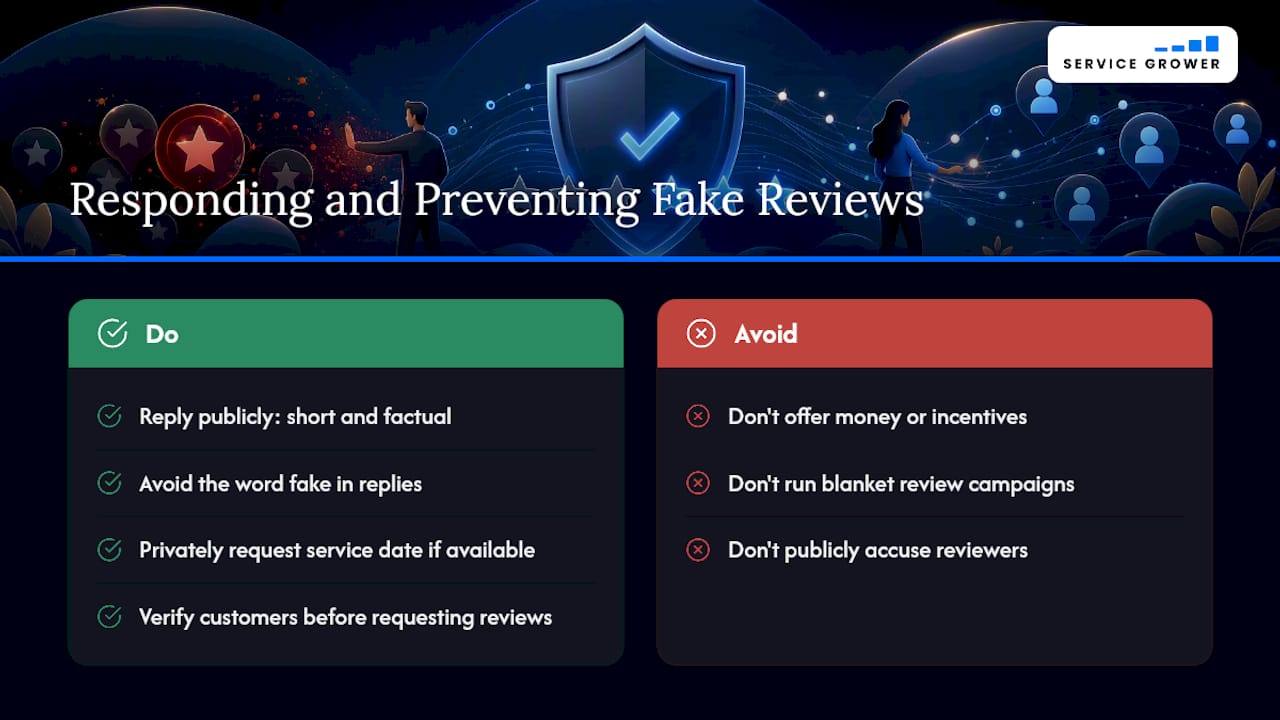
Removal isn’t guaranteed, so your public reply carries real weight. Keep it short, factual, and free of the word “fake,” since that word can read as combative to anyone browsing your listing.
For a vague negative review:
For a review making a specific false claim:
If you have the reviewer’s contact information from a real transaction, a brief private message works too: “We saw your review and want to understand what happened. Could you confirm the date of service so we can look into it?” Never offer money or incentives in exchange for changing or removing a review; that creates its own policy problem.
Prevention beats cleanup every time; for a practical operational checklist, see our step-by-step guide for SMBs. Verify customers before requesting reviews, ask for feedback only from people who actually transacted with you, monitor your listings weekly, and never run a blanket “leave us a good review” campaign that Google could flag as gated feedback.
How Long Does It Take to Remove a Fake Review?
Set realistic expectations from the start, because this process moves slower than most owners want.
- Automated detection: Google’s systems flag obvious spam within days of your report.
- Human review: A genuine policy assessment can take anywhere from a few days to a couple of weeks.
- Appeals: Timing varies, and you’ll get an email notification when a decision is reached.
- Legal removal routes: These can stretch into months, and they usually carry real cost if you involve counsel.
If your flag comes back rejected, that’s not the end. File your one-time appeal with tighter evidence, keep the case tracked in the Reviews Management Tool, and start building a public reply and a documentation file in case a legal step becomes necessary later.
- Track every case number and decision date in one spreadsheet.
- Save your appeal evidence separately from your original report evidence.
- Keep collecting new, genuine reviews the entire time; volume dilutes the damage of one bad post.
What Not to Do When Fighting a Fake Review
A handful of instinctive reactions will make your situation worse, not better.
- Never pay or negotiate with a reviewer who threatens to leave a bad review unless you comply with a demand. That’s extortion, and paying it invites more of the same.
- Never post fake positive reviews to counter a fake negative one. Google’s detection systems look for exactly this pattern, and it can get your whole profile penalized.
- Never include a customer’s private details in a public reply, even to defend yourself. That’s its own policy violation.
The FTC’s rule banning fake reviews and testimonials makes clear that buying, fabricating, or incentivizing reviews is illegal, not just against platform policy. If a reviewer demands payment for removal, document the messages and report it through Google’s suspicious review channel rather than responding privately. Save screenshots before the reviewer can delete their own messages, and loop in local law enforcement if the demand is explicit and repeated.
How Service Grower Handles Fake Review Monitoring
Chasing down suspicious reviews manually, on top of running a business, eats hours you don’t have. Service Grower’s reputation-management tools handle the parts that take the most time.
- Continuous monitoring flags unusual review patterns, like a sudden cluster of one-star posts, before they pile up.
- Evidence archiving keeps screenshots and timestamps organized automatically, so you’re not scrambling when you need to file an appeal.
- Response templates keep your public replies consistent and calm across every location you manage.
- Managed support-case escalation helps push a rejected flag through the right channel with the right documentation attached.
For owners juggling multiple locations, the bigger win is volume: a steady stream of genuine new reviews from real customers pushes one bad post further down the page while your case works through Google’s system.
If You Want Help: What Service Grower Does Next
Handling review disputes solo means learning Google’s policy categories, tracking case statuses, writing evidence packages, and still running your actual business. Service Grower folds all of that into one platform instead of leaving you to juggle spreadsheets and screenshots on your own.

The platform monitors your listings for suspicious review activity, archives evidence automatically the moment a questionable review lands, and manages the escalation process with Google’s support channels on your behalf. It also keeps a steady flow of genuine reviews coming in through AnswerReady websites and review-request tools, so isolated bad reviews carry less weight against your overall rating. For local businesses that also want to build visibility while a dispute plays out, pairing this with a local search and Google Ads plan keeps new customers finding you regardless of what’s happening on one review thread.
If you’d rather not manage this alone, book a 15-minute consultation to walk through your specific situation and see whether a managed approach fits your business.
Sources
- Manage your Google Business reviews - Google Business Profile Help
- Federal Trade Commission announces final rule banning fake reviews, testimonials
- How To Report Suspicious Online Reviews | Consumer Advice
- Google Legal Removal Request (defamation guidance)